Vibe coding module
AvailableRatchet system guide
The complete Ratchet system documentation: overview, architecture, the loop contract, Composer, Vault, design principles, and the Mermaid diagram gallery, plus the phase A–E rebuild checklist for standing the system up from scratch. The pack ships as versioned markdown alongside this site; this page is the canonical module entry point that orients you before you dive into the files.
Expert expands every “Advanced” section below; Beginner collapses them. You can still open or close any single one afterward.
Get set up#
Do this once, before anything else on this page.
Download the system zip into your project folder
Pick (or create) the folder where you want to work with your AI coding tool, and download Ratchet system guide v1.2 directly into it — no login, no form.
Open your AI coding tool in that same folder
Launch your AI coding tool (Claude Code, Cursor, or similar) with that folder as its working directory — the same one the zip just landed in.
Run the setup prompt
Paste this into your AI coding tool. It unzips the pack and finishes initial setup for you:
promptUnzip ratchet-guide-v1.2.zip in this folder, then read the pack in order: README.md, then overview → architecture → principles → layout → loop-and-missions. Follow the product contracts strictly: - Live deploy gate via an honest public version signal (tester judges the live URL only) - Builder proof-of-work from git state only (ignore agent claims) - Secrets only via a credentials boundary — never in builder env - Multi-step goals → multiple queue items - Optional infra ensure is fail-closed; prefer bound cloud project identities - Overnight helpers may observe only; they never implement product features Start with: loop + mock roles + mission shape validation. Then: goal capture + queue. Then: real builder/tester roles and a credentials boundary stub. Do not invent machine-specific install paths or operator runbooks.
Understand what Ratchet does#
Ratchet is a control plane for AI software work that only calls a change “done” once the live site agrees. Every mission runs a build-and-verify loop: a coding agent builds and pushes real commits, a deploy gate waits for the live app to catch up, and a read-only tester checks the deployed product before the run is allowed to advance. A mission finishes only after a streak of consecutive live-verified passes — like a mechanical ratchet, the loop only moves forward.
Run your first mission#
Five minutes, start to finish. These steps are everything a first-time user needs — no other reading required before you start.
Create a product shell
In Composer, click New product shell and bind it to your Git remote field, your Live URL field, and a Version endpoint field (e.g.
GET /version) that returns the deployed git SHA.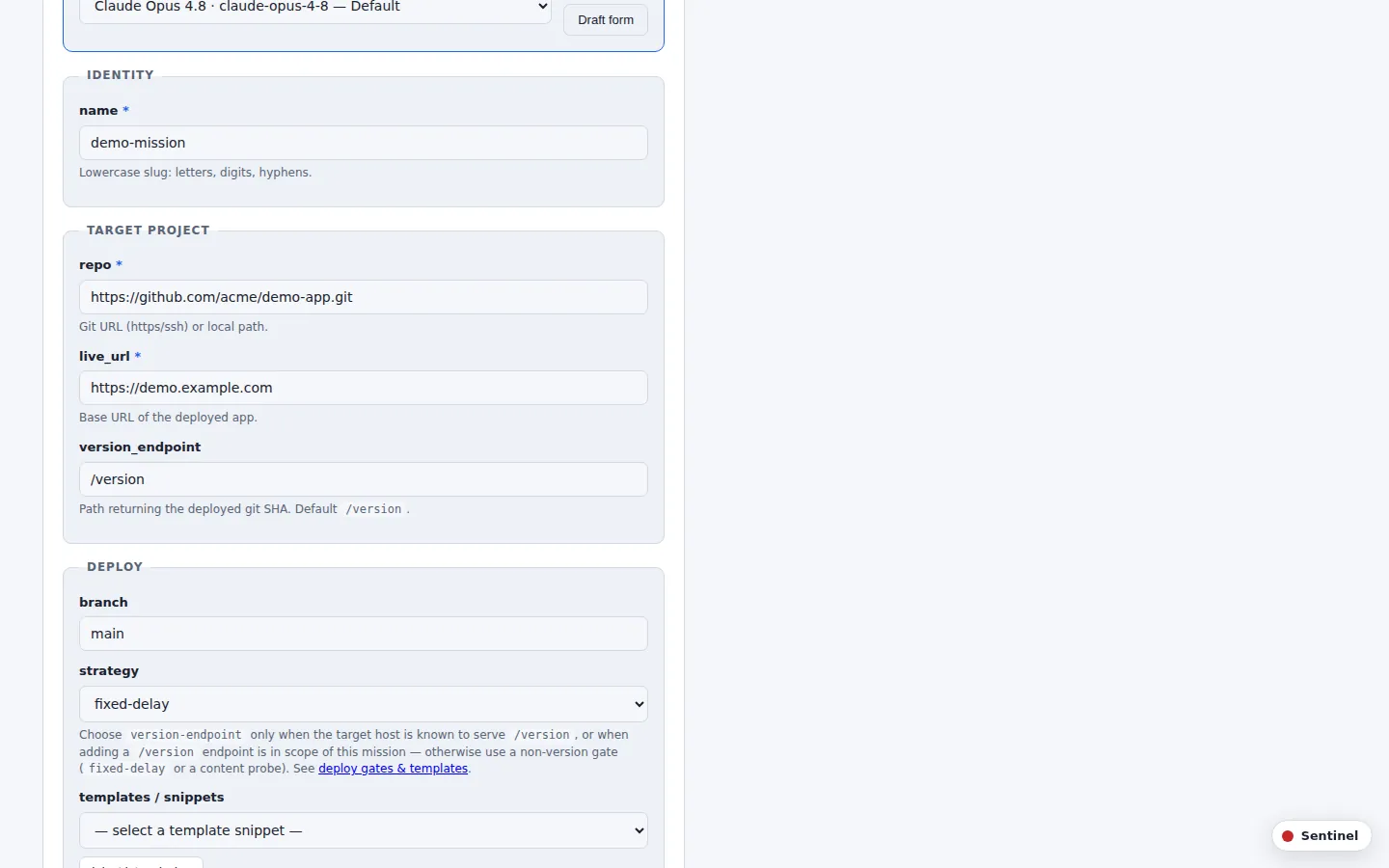
Composer's product shell setup screen, showing the Git remote, Live URL, and Version endpoint fields. Confirm your deploy and version endpoint
Make sure your host deploys automatically on push to your deploy branch, and that the Version endpoint is publicly reachable without a control-plane login — the deploy gate polls it directly. Confirm it responds before you start:
shellcurl -s https://your-app.example.com/versionDescribe your goal
Open Composer's Goal capture screen and type the change into the Goal field in plain language, e.g. “Change the homepage CTA label to ‘Get started’.” Note anything the change must not touch in the Constraints field.
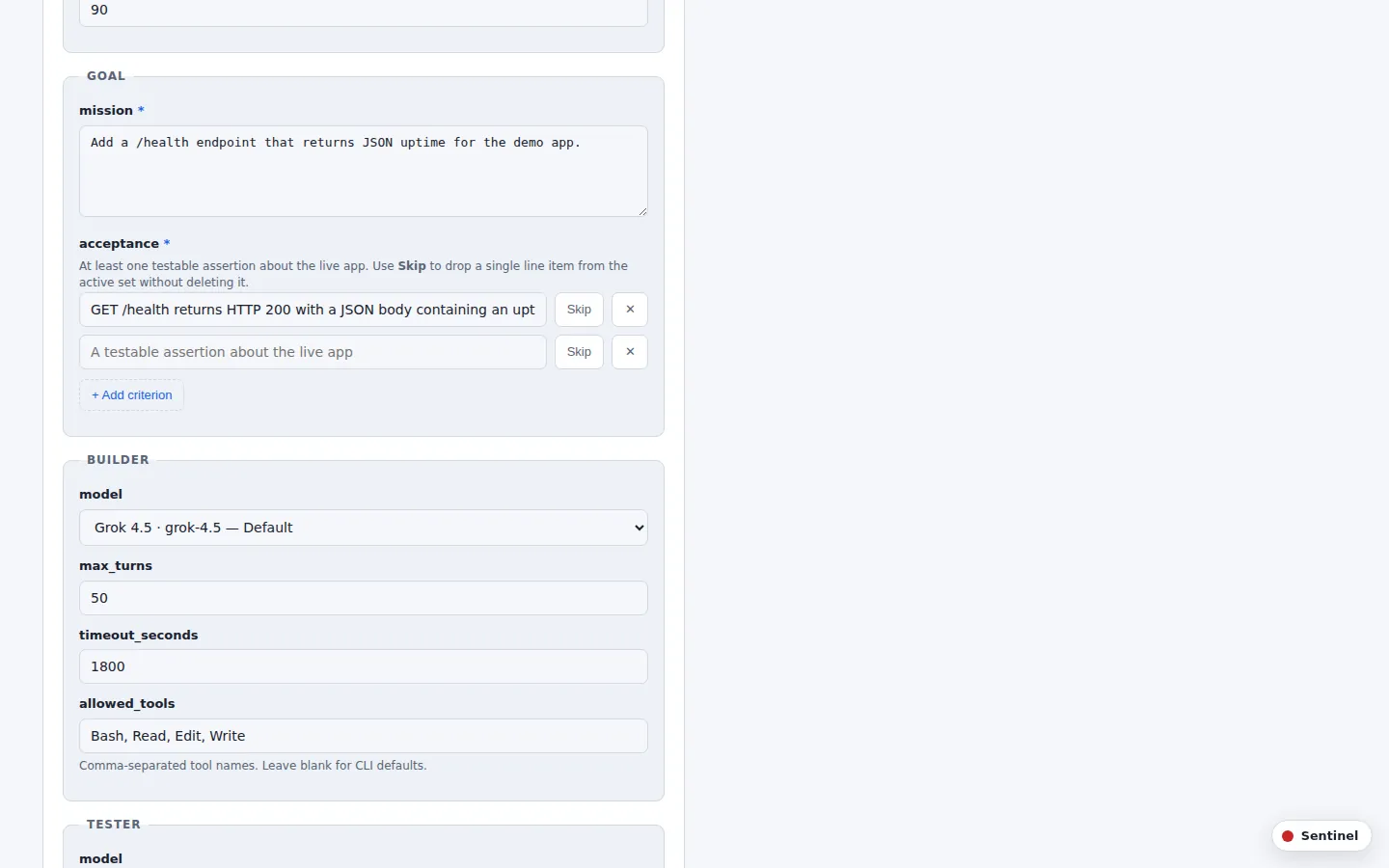
The goal capture screen, with the Goal and Constraints fields. Accept the draft queue
For anything beyond a one-line goal, Composer splits it into a small queue of focused steps instead of one mega-mission. Click Accept draft to take the queue as-is for a first run.
The draft queue screen, showing the proposed steps and the Accept draft button. Set your limits
Choose a Max iterations field, a Pass streak field — the run of consecutive live passes required to finish (2 is a reasonable first value) — and an optional Spend cap field.
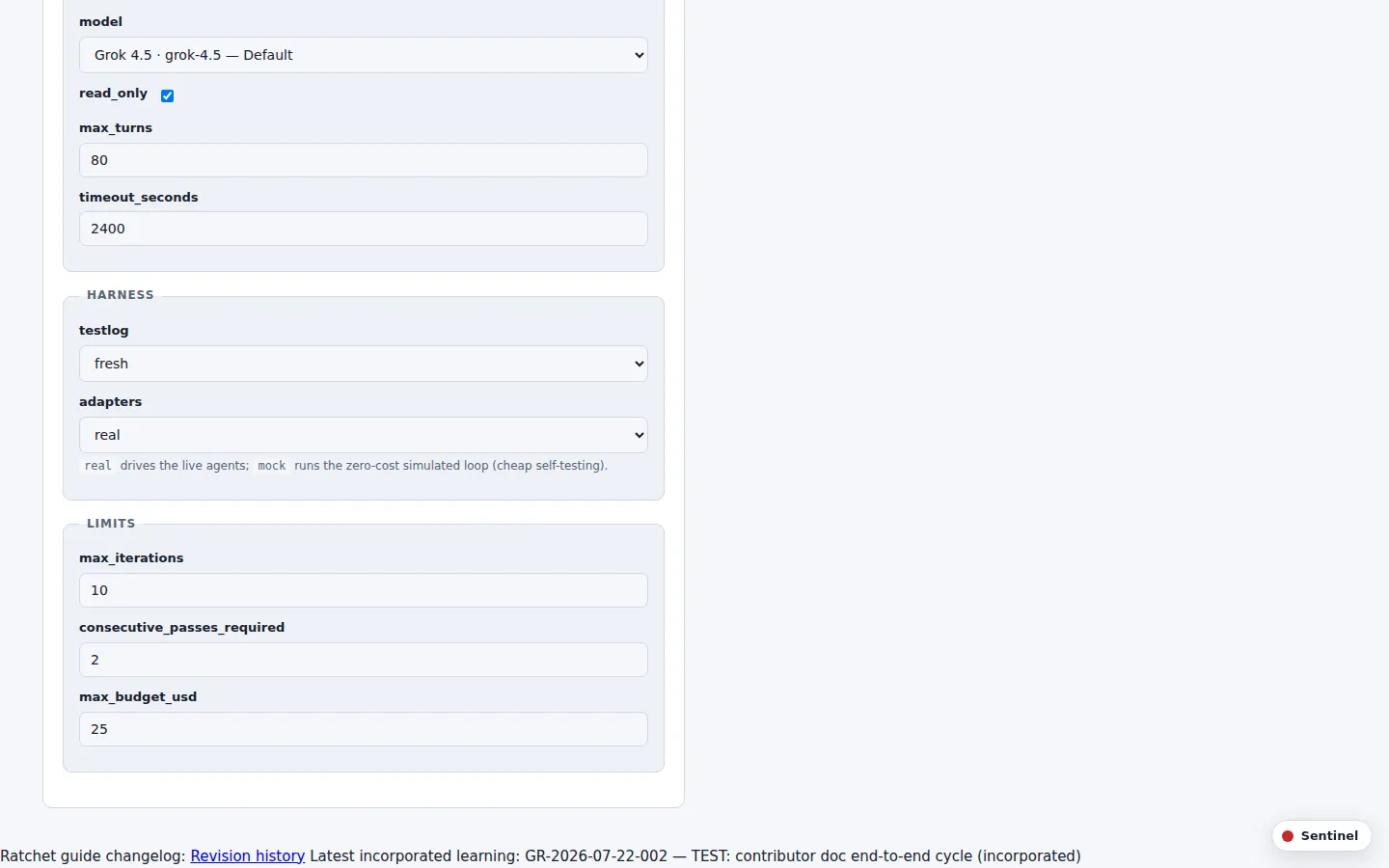
The run limits screen, with Max iterations, Pass streak, and Spend cap fields. Start the run
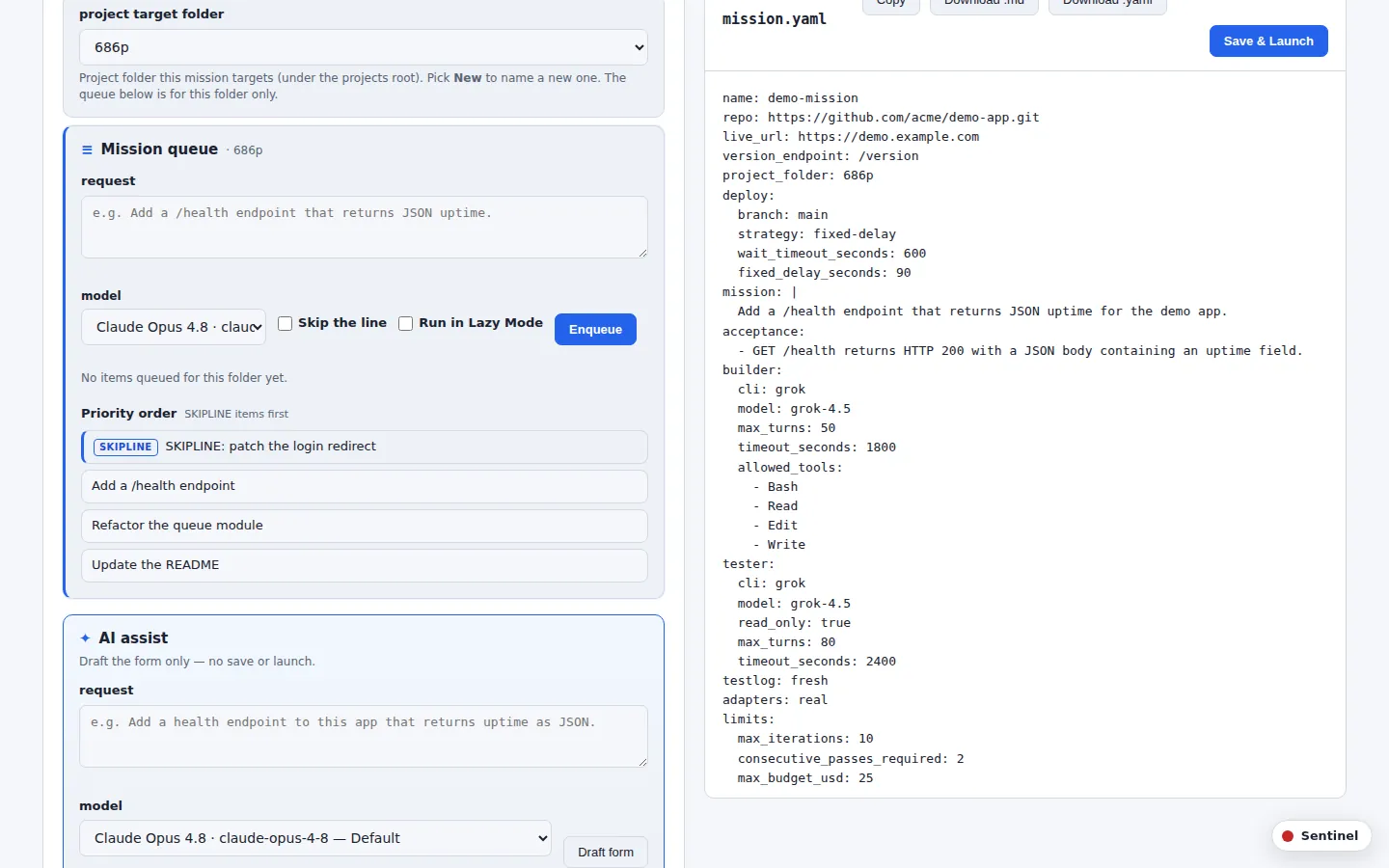
Click Save & Launch. Each iteration is automatic: the builder pushes real commits, the deploy gate waits until your version endpoint matches the new SHA, and a tester checks only the live app and returns PASS or FAIL.
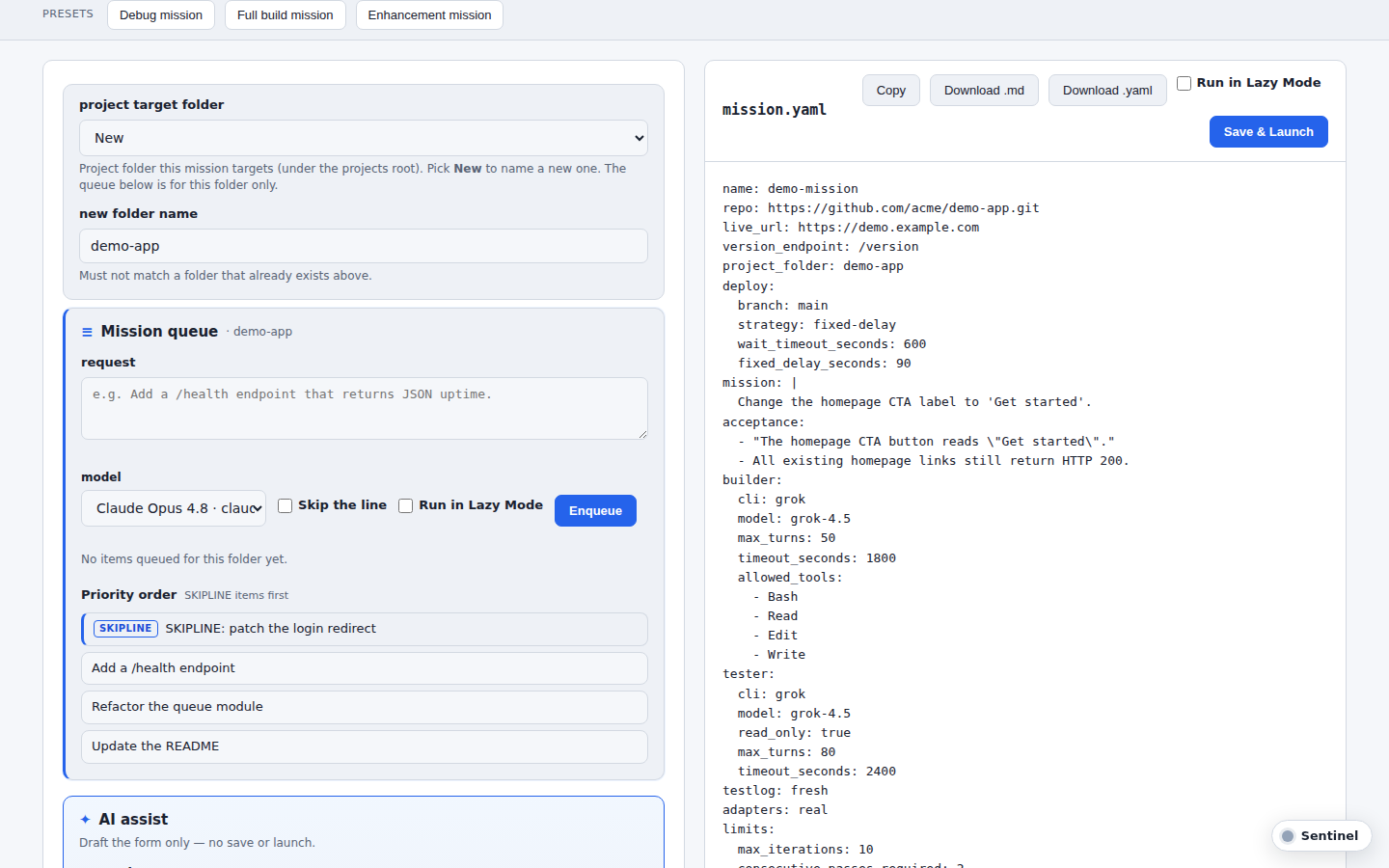
The composer's mission control view, showing the mission.yaml preview and the Save & Launch button. Watch it iterate
Track progress on the Mission timeline panel. A FAIL carries the tester's feedback into the next build automatically. A PASS advances the streak. You do not need to intervene between iterations.
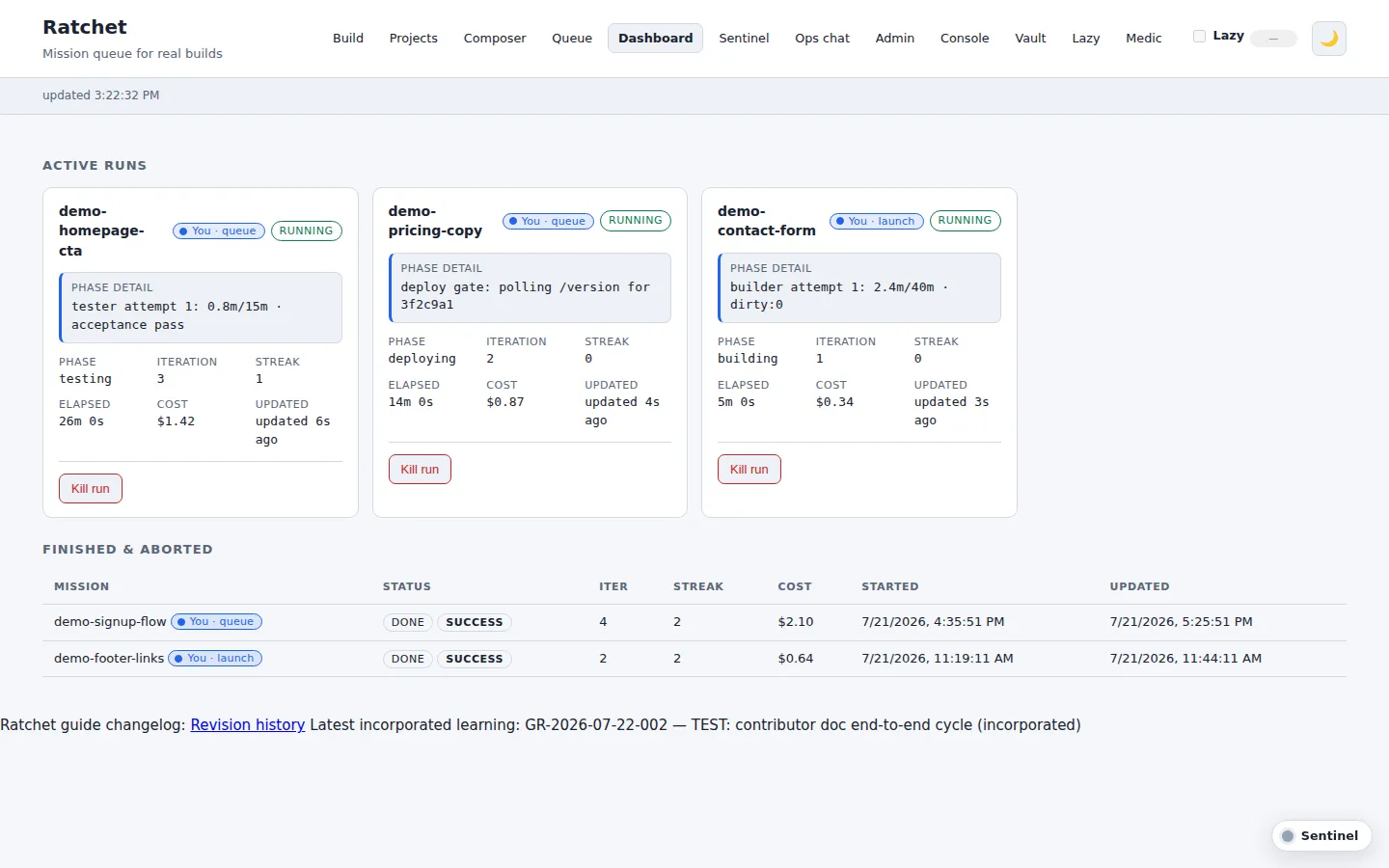
The dashboard's mission timeline, showing each active run's phase (building, deploying, testing), iteration, and pass streak, with finished runs below. Confirm your first pass
The mission finishes on its own once the required streak is reached. Open your live URL to confirm the change actually shipped.
Run the build, deploy, and test loop#
Every mission, first run or hundredth, repeats the same three-stage loop against the live product:
Build → Deploy gate → Test
   ↑                    │
   └──── FAIL ────┘
        PASS streak → done
Build real, provable changes#
The coding agent changes the product and must produce real git history: an actual commit that advances the branch, matches the pushed remote, and leaves a clean working tree — not just a claim of being done.
Wait for the deploy gate to confirm your push#
After a push, the deploy gate polls your product's version endpoint until it returns the SHA that was just pushed.
The gate now offers three deploy-gate strategies, so a product can prove its deploy landed in whatever way fits its host: version-endpoint (the default — poll the version signal until it serves the pushed SHA), fixed-delay (wait a set interval, the escape hatch for products with no version endpoint), and command (re-run a command until it exits 0).
Test only the live, deployed app#
Once the gate confirms the deploy, a read-only tester exercises the live app only, never the builder's own claims about what changed. The tester returns a structured PASS or FAIL: FAIL carries actionable feedback into the next build iteration, and PASS advances a streak counter. Only consecutive live passes count — a single FAIL resets the pass streak to zero, so the required streak has to be reached with no failing iteration in between. The loop keeps repeating build → deploy gate → test until the required streak of consecutive passes is reached.
The tester is structurally sandboxed: it runs with no repo clone at all — only the live URL and the shared test log — and follows a three-pass protocol in priority order: a regression pass (re-verify every previously reported bug against the live app), an acceptance pass (check each criterion), and an expansion pass (probe at least one area no earlier run covered).
Know what “done” means at every layer#
| Layer | Done when |
|---|---|
| Single mission | A streak of consecutive live passes |
| Deploy gate | Live version signal matches what the builder just pushed |
| Builder step | Real git work is proven — not agent claims alone |
| Product campaign | Each focused step succeeded (or was intentionally dropped) |
Go further with advanced usage#
Once your first mission has passed, these patterns cover real product work and the rest of the pack.
Plan multi-step campaigns instead of one mega-mission#
A real product goal is often several missions, not one. Composer's planner expands a multi-part goal into a handful of focused steps.
Turn on infrastructure provisioning carefully#
Some missions can plan or provision infrastructure before the build starts. Leave optional provisioning off until the core build-deploy-test loop is reliable on its own.
Avoid the common design pitfalls#
A short list of mistakes that repeatedly derail otherwise-working loops.
Know the core components#
A quick reference for the five pieces that make up the system.
Read the full system guide#
The six key documents of the v1.2 pack, rendered as pages on this site and chained prev/next in read order.
1 of 6
Overview
Elevator pitch, happy-path flow, and component cheat sheet
2 of 6
Architecture
System map, trust boundaries, and end-to-end data flow
3 of 6
One-pager
Single-sheet printable summary of the whole system
4 of 6
Rebuild checklist
Greenfield rebuild checklist in phases A–E
5 of 6
AI prompt pack
Paste-ready prompts for rebuild, new product, and friend share
6 of 6
Footguns
Design pitfalls: contracts, boundaries, and fix directions
Browse every file in the pack#
Every document in the sanitized pack, in manifest order. Entries marked “Guide page” are rendered on this site; the rest open as the pack's plain markdown or self-contained HTML, served alongside it.
Troubleshooting & FAQ#
The most common ways a mission gets stuck, in symptom → cause → fix order. Each entry links back to the relevant how-to section above.
I can't start a run — Composer says a field is missing#
Cause: the product shell's Git remote, Live URL, or Version endpoint field was never filled in, so Composer has nothing to bind the mission to.
Fix: go back to Run your first mission and set all three product shell fields before queuing another run.
My deploy never finishes and the gate looks stuck#
Cause: the version endpoint is behind auth, pointed at the wrong product, or otherwise unreachable, so the deploy gate can never see a matching SHA even though the build succeeded.
Fix: curl the endpoint directly with no login and confirm it belongs to the same product shell as your live URL. See Wait for the deploy gate to confirm your push.
My version endpoint isn't returning the new SHA after I push#
Cause: the host isn't set to auto-deploy on push to the branch you're pushing, or the endpoint returns a build-time constant instead of reading the currently deployed SHA.
Fix: confirm auto-deploy is wired to your deploy branch and that a fresh curl of the endpoint changes after every push — see Confirm your deploy and version endpoint.
The tester keeps failing the same criterion every iteration#
Cause: the builder isn't producing a real, content-changing commit each iteration, or the tester is exercising a different live URL than the one that actually changed.
Fix: check git history for an actual advancing commit per iteration (see Build real, provable changes) and confirm the tester targets the same live app the deploy gate just confirmed (see Test only the live, deployed app).
My mission stopped before reaching a pass streak#
Cause: the Max iterations or Spend cap limit was reached before the required run of consecutive passes. A single build or test step can also end a run on its own: per-invocation wall-clock timeouts supervise every builder and tester call, and on a timeout the whole process group is killed and the step gets exactly one retry before the run stops.
Fix: raise the iteration or spend limit, lower the Pass streak field (see Set your limits), or split the goal into a multi-step campaign so each piece can finish on its own (see Plan multi-step campaigns instead of one mega-mission).
Changelog#
Recent Ratchet improvements folded into this guide, newest source first. Each row is covered somewhere in the sections above and has an explicit date it shipped. The full record — including improvements still pending with a reason — lives in the learnings log.
Note: on 2026-07-22, all screenshots in this guide were refreshed against the live dash.saniorem.com dashboard.
Note: on 2026-07-22, the “Start the run” step gained a real capture of the composer's mission control view (Save & Launch), and the “Watch it iterate” step gained a real capture of the dashboard's mission timeline — rendered with sanitized demo-mission data only, so no operator run data appears in frame.
Revision history#
Each published revision of this guide has a stable revision id and names exactly which learnings it incorporated, with the date each was folded in. This is produced by the repeatable guide-update workflow.
- GR-2026-07-22-002Published
TEST: contributor doc end-to-end cycle
Verify the docs/learning-cycle.md contributor runbook by driving one learning end to end.
Learnings incorporated in GR-2026-07-22-002:
- TEST: contributor doc end-to-end cycle (L-2026-07-22-contributor-doc-e2e) — incorporated in revision GR-2026-07-22-002
- GR-2026-07-22-001Published
Pass streak resets to zero on a FAIL
Clarify that only consecutive live passes count toward finishing a mission — a FAIL resets the streak.
Learnings incorporated in GR-2026-07-22-001:
- A FAIL resets the pass streak to zero (L-2026-07-22-streak-reset) — incorporated in revision GR-2026-07-22-001
Incorporated improvements
| Date | Improvement | Where it's covered | Source |
|---|---|---|---|
| Three deploy-gate strategies: version-endpoint, fixed-delay, and command | Wait for the deploy gate to confirm your push | README · Deploy strategies | |
| CI-gated deploys with the command strategy | Wait for the deploy gate to confirm your push | README · Deploy strategies | |
| Structurally sandboxed live tester with a three-pass protocol | Test only the live, deployed app | README · The real tester | |
| Append-only TESTLOG bug ledger | Test only the live, deployed app | README · TESTLOG.md | |
| Per-invocation wall-clock timeouts with one retry | Troubleshooting & FAQ | README · Guardrails |
This changelog tracks Ratchet product improvements reflected in the guide. For the history of the documentation pack itself, see the pack CHANGELOG.